Design and Implementation of a Self-Paced Listening Experiment with Integrated Bilingual Language Profiling (Quechua-Spanish)

Overview
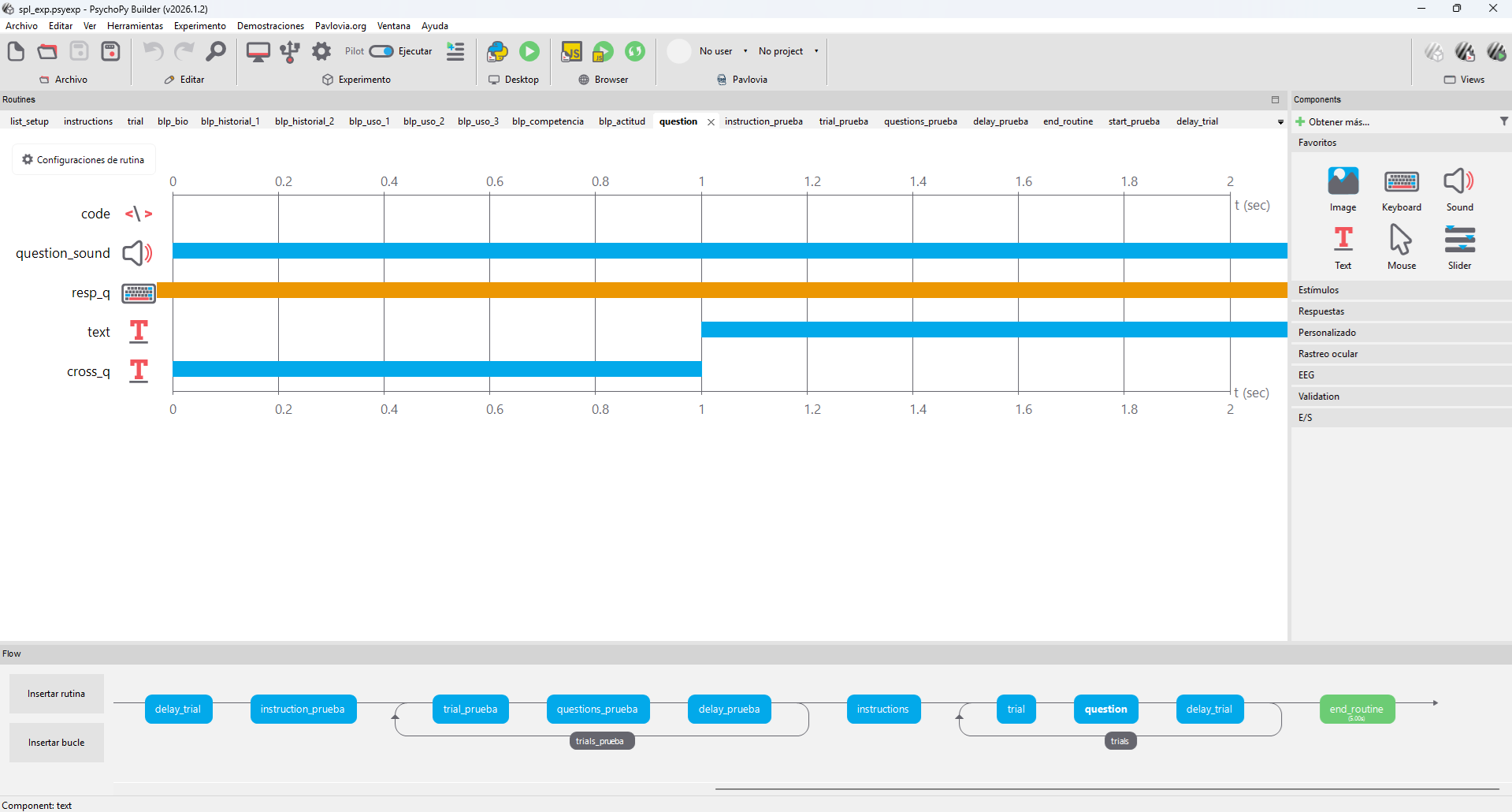
Figure 1. PsychoPy Builder timeline, trial loop and stimulus routines.
This project presents the design, implementation, and analysis pipeline of a Self-Paced Listening (SPL) experiment integrated with a Bilingual Language Profile (BLP) questionnaire, developed as part of my work in the Arizona Applied Psycholinguistics Lab (AAPL) .
The primary goal of the project was to create a fully reproducible psycholinguistic experiment pipeline, including:
- Experimental design and stimulus presentation. (PsychoPy)
- Participant interaction and reaction time collection.
- Bilingual profiling through structured questionnaires.
- Automated data cleaning and restructuring (Python).
- A repository-ready architecture for reproducibility and reuse.
Project Goals
The project was designed around three main objectives:
- Implement a controlled SPL paradigm
- Present auditory stimuli segmented across multiple steps.
- Record precise reaction times at each segment.
- Capture comprehension responses following each trial.
- Integrate a bilingual profiling system
- Collect demographic and linguistic background data.
- Measure language use, proficiency, and attitudes.
- Ensure usability across Spanish and Quechua contexts.
- Develop a reproducible data pipeline
- Clean and standardize raw PsychoPy outputs.
- Merge experimental and questionnaire data.
- Prepare datasets for statistical analysis.
Experimental Design
Self-Paced Listening Paradigm
The SPL task is a widely used method in psycholinguistics to study incremental sentence processing. In this implementation:
- Each sentence is divided into 7 audio segments.
- Participants press the spacebar to advance between segments.
- Reaction time is recorded at each step.
After the final segment:
- A comprehension question (segment 8) is presented.
- Participants respond using:
- F = Sí [Yes]
- J = No [No]
This design allows us to measure the processing time at each segment, sensitivity to linguistic structure and comprehension accuracy.
Stimuli Structure
Audio stimuli follow a structured naming convention:
d_[list][sublist]_seg[number].wav
Example:
- d_1a_seg1.wav = Segment 1
- d_1a_seg8.wav = Question audio
Each trial is associated with metadata:
item_idlistfonologia[phonology]genero[genre]spl_exp(experimental condition)
Two lists are used for counterbalancing participants, ensuring experimental control. The structure I followed was:
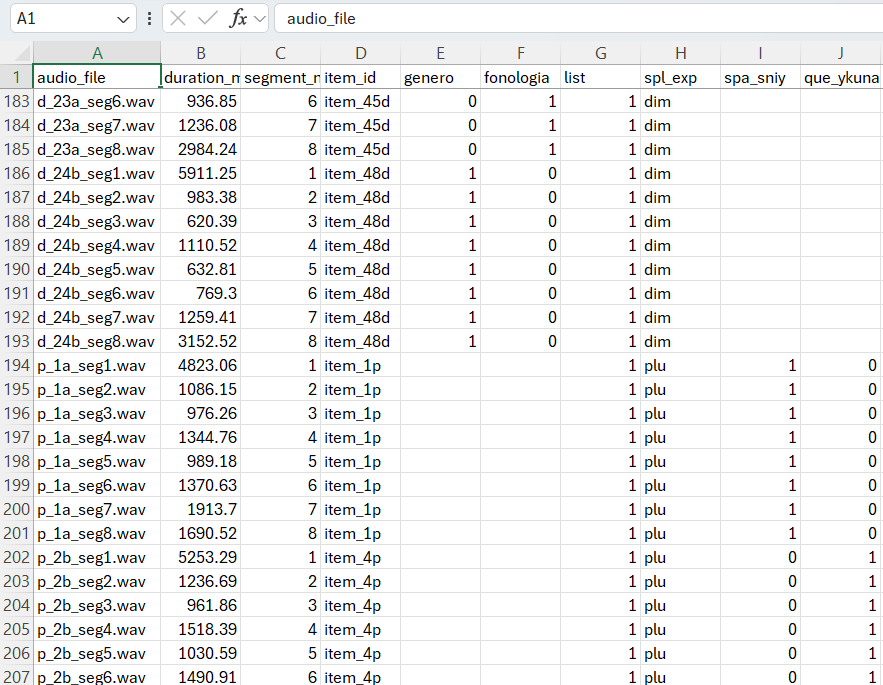
Figure 2. Master Stimuli with Counterbalancing for PsychoPy.
Pseudorandomization
To avoid order effects, I implemented a pseudorandomization constraint:
No more than two consecutive items may belong to the same condition.
This was implemented in PsychoPy using custom Python logic:
- Items are shuffled dynamically at runtime.
- A validation function enforces constraints.
- The final order is applied before the experiment begins.
Pseudorandomization snippet
items = df["item_id"].unique().tolist()
items_d = [it for it in items if it.endswith("d")]
items_p = [it for it in items if it.endswith("p")]

random.shuffle(items_d)
random.shuffle(items_p)

final_order = []

while items_d or items_p:
    if len(final_order) >= 2 and final_order[-1][-1] == final_order[-2][-1]:
        choice = "p" if final_order[-1].endswith("d") else "d"
    else:
        choice = "d" if len(items_d) >= len(items_p) else "p"

    if choice == "d" and items_d:
        final_order.append(items_d.pop())
    elif choice == "p" and items_p:
        final_order.append(items_p.pop())
Bilingual Language Profile (BLP)
A major extension of this project was the integration of a multi-section bilingual questionnaire, adapted for Spanish and Quechua speakers.
Sections Implemented
- Biographical Information
- Age, gender, birthplace, education
- Parents’ languages
- Language History
- Age of acquisition
- Years of exposure
- Formal education in each language
- Language Use
- Usage percentages across contexts:
- Family
- Work
- Thinking
- Social environments
- Usage percentages across contexts:
- Language Competence
- Self-rated proficiency:
- Speaking
- Understanding
- Reading
- Writing
- Self-rated proficiency:
- Language Attitudes
- Identity and cultural affiliation
- Native language perception
Project Breakdown
1. Preprocessing: Audio Durations, Counterbalanced Lists, and Master Stimuli Generation
The first stage of the project focused on preparing the materials needed to run the experiment in PsychoPy. This preprocessing step had three main goals:
- Extract the exact duration of each audio segment in milliseconds.
- Generate four counterbalanced experimental lists.
- Create the Bilingual Language Profile (BLP) form structure.
This stage was necessary because the experiment relies on segmented [.wav] files, and each segment must be presented with precise timing. By calculating the duration of each file ahead of time, I was able to control the flow of the stimuli more accurately and prepare the condition files that PsychoPy would later load during the experiment.
Purpose
The preprocessing code was designed to support several parts of the experiment at once. Specifically, it was used to:
- Control timing between stimuli.
- Create four lists for counterbalancing participants across conditions.
- Support later logging and timing analysis.
- Add the experiment condition label for each item:
- Diminutive (
dim) - Plural (
plu)
- Diminutive (
- Create the Bilingual Language Profile (BLP) form input structure.
Master Stimuli and ms Extraction snippet: This pipeline calculates the duration (in milliseconds) of each .wav audio segment in a folder. After that it creates 4 lists, merge them as a master stimuli that can be uploaded to a PsychoPy Experiment.
import os
from pydub import AudioSegment
import pandas as pd

audio_dir = r"MY_PATH"

def get_duration_ms(file_path):
    audio = AudioSegment.from_wav(file_path)
    return len(audio)  # duration in milliseconds

rows = []

for file in os.listdir(audio_dir):
    if file.endswith(".wav"):
        path = os.path.join(audio_dir, file)
        duration = get_duration_ms(path)

        rows.append({
            "audio_file": file,
            "duration_ms": duration,
            "segment_number": int(file.split("seg")[-1].replace(".wav", "")),
            "spl_exp": "dim" if "d_" in file else "plu"
        })

df = pd.DataFrame(rows)
df.to_csv("durations.csv", index=False, encoding="utf-8-sig")
2. Bilingual Language Profile (BLP) Implementation
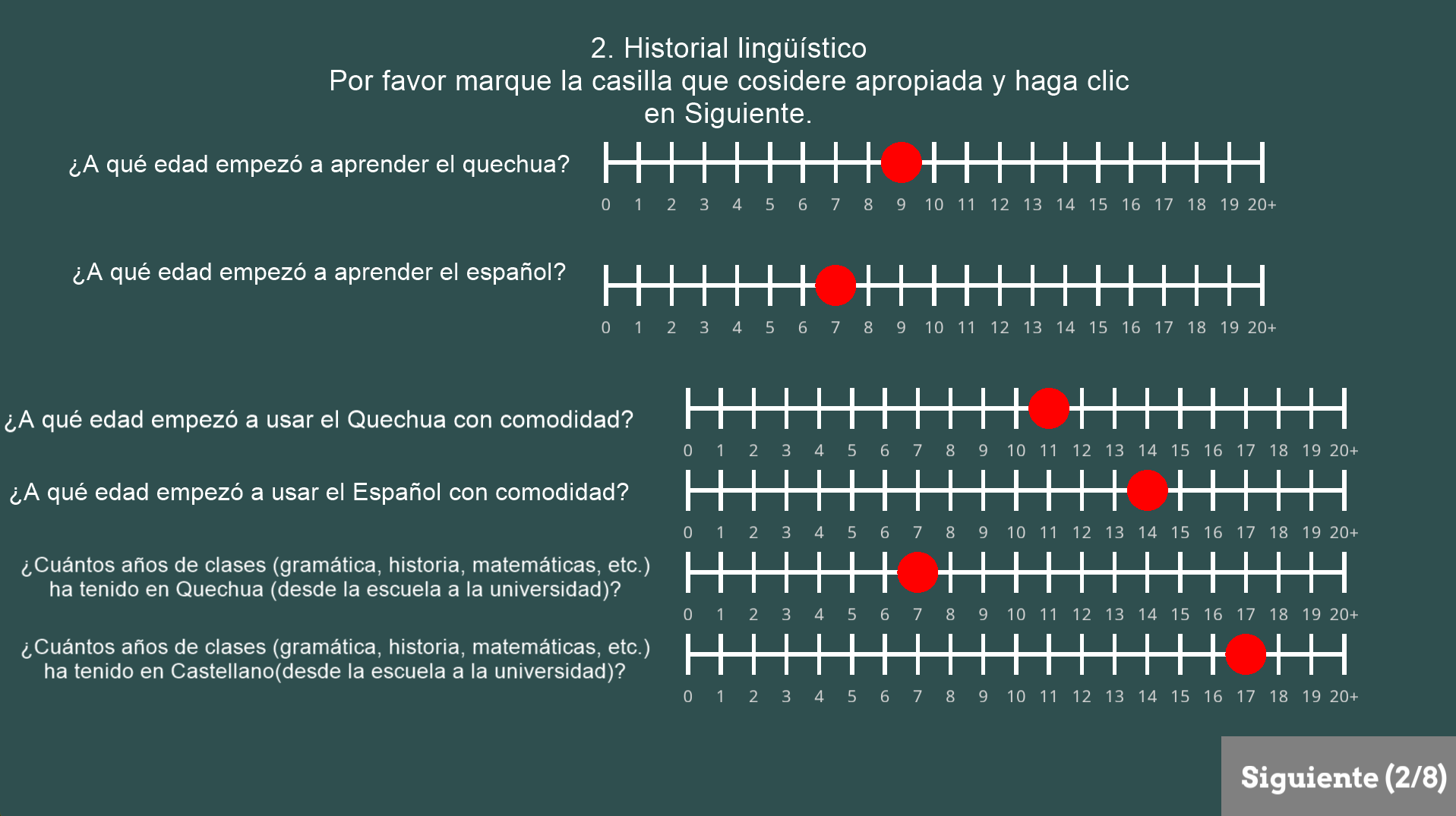
Figure 3. GUI in PsychoPy for the experiment.
The second major part of the project was the implementation of a Bilingual Language Profile (BLP) questionnaire directly inside PsychoPy. The purpose of this component was to gather participant background information relevant to bilingualism, language use, and self-reported proficiency.
The BLP section was designed to complement the self-paced listening task by providing a richer profile of each participant’s linguistic experience. This was especially important because the project involved bilingual participants and required more than simple demographic information.Sections Included
The BLP implementation was divided into multiple sections:
- Biographical information.
- Language history.
- Language use.
- Language competence.
- Language attitudes.
The questionnaire included items such as:
- Age and place of birth.
- Current residence.
- Parents’ languages.
- Age of acquisition for each language.
- Years of formal education in each language.
- Self-reported speaking, reading, writing, and comprehension ability.
- Patterns of language use with family, friends, work, and internal thought.
- Identity and attitude toward the participant’s languages.
Design Decisions
At first, I explored PsychoPy’s Form component to build the questionnaire. However, in practice this created substantial lag and reduced the performance of the experiment, especially on less powerful computers. To solve this, I redesigned the BLP using a combination of:
- TextBox2 for open-ended text fields
- Sliders for ratings and numeric scales
- Custom “Siguiente” buttons for navigation
- Code components to enforce that participants could only continue after answering all required questions
This redesign significantly improved usability and performance. It also gave me greater control over the visual layout, response validation, and multilingual interface design.
Why This Matters?
This part of the project showed me that building experimental tools often requires balancing theory and implementation. From an HLT perspective, the BLP section demonstrates the use of technical tools to collect structured linguistic data while maintaining an accessible participant experience.
3. Prueba Step: Practice Version of the Experiment
Before running the full experiment, I created a practice version (`prueba`) to test the full pipeline in a controlled way. This step served as a smaller-scale version of the experiment and was essential for debugging timing, audio playback, keyboard responses, and questionnaire flow.
The practice trials allowed me to verify that:
- Segmented audio played in the correct order.
- Participants could advance with the spacebar.
- Comprehension questions appeared correctly.
- Key responses (
fandj) were recorded properly. - Timing variables were stored as expected.
- PsychoPy loaded the correct CSV condition files.
- The BLP routines worked as intended inside the full experiment structure.
This stage was important because it exposed problems that would have been difficult to diagnose during real participant testing. For example, it helped identify issues related to routine transitions, lag caused by certain interface elements, and how PsychoPy stored response data in the output CSV files.
By separating a practice phase from the main experiment, I was able to test the experimental logic more safely and make iterative adjustments before final deployment.4. Testing and Experimental Refinement
Once the preprocessing and practice stages were complete, I moved to a broader testing phase. This involved repeatedly running the experiment in PsychoPy and refining both the task structure and participant interface.
Several important implementation issues were resolved during this stage:
Audio Timing
One of the main testing goals was to confirm that each audio segment stopped at the correct point. Since the experiment depends on segmented listening, even small timing inconsistencies could affect the validity of the task. The preprocessing step with duration extraction was therefore critical for reliable playback.
I also examined the difference between PsychoPy log timings and CSV output timings. In particular, the reported value of [audio_stopped] in the CSV did not always exactly match the “Audio finished at” time in the PsychoPy log. This helped me better understand the difference between internal PsychoPy timing and data written to the output file, including small processing delays.# Convert response time from seconds to milliseconds
if resp_q.rt is not None:
resp_q_rt_ms = resp_q.rt * 1000
else:
resp_q_rt_ms = None
# Label the F/J response as Sí/No
if resp_q.keys == 'f':
resp_label = 'Sí'
elif resp_q.keys == 'j':
resp_label = 'No'
else:
resp_label = 'Sin respuesta'
# Add data to the PsychoPy output file
thisExp.addData('resp_key', resp_q.keys)
thisExp.addData('resp_label', resp_label)
thisExp.addData('resp_q_rt_ms', resp_q_rt_ms)
Fixation Cross and Routine Flow
At one point, the fixation cross routine caused the next audio segment to begin automatically before the participant was ready. After testing several configurations, I removed the fixation and instruction elements that were interfering with participant-controlled pacing. This restored the intended self-paced behavior of the task.
Performance and Lag
The most significant technical issue was lag. Through testing, I found that PsychoPy’s Form component was one of the main sources of slowdown. Splitting the questionnaire into smaller routines helped somewhat, but the strongest improvement came from replacing Forms with TextBox2 and Sliders.
5. Data Cleaning and Restructuring
The last major stage of the project was the data cleaning pipeline, which transformed PsychoPy’s raw output into a cleaner and more analysis-ready format.
Raw PsychoPy CSV files contain a large number of internal columns that are useful for the software itself but not necessarily useful for statistical analysis. In addition, because the experiment combined segmented trials with questionnaire-style responses, the resulting CSV files needed to be reorganized carefully.Goals of the Cleaning Process
The cleaning script was designed to:
- Remove unnecessary PsychoPy metadata columns.
- Preserve the important timing and response variables.
- Exclude practice rows from the final dataset.
- Reorganize questionnaire responses into a more interpretable format.
- Move important columns next to
spl_expfor readability. - Save cleaned files in a format that preserves Spanish accents correctly.
Main Cleaning Operations
The cleaning process included the following steps:
- Removing metadata columns such as trial counters and internal PsychoPy variables.
- Filtering out practice rows labeled as
prueba. - Keeping only relevant response columns.
- Standardizing empty responses and invalid values.
- Moving timing variables like reaction time and key response fields closer to the experiment label column.
- Exporting cleaned CSV files with
utf-8-sigencoding so that accented characters display correctly in Excel.
A important part of this process was handling the questionnaire output. Since PsychoPy writes different routines in different row structures, the cleaning pipeline had to collapse the form-related information into a more manageable format while preserving the segmented listening trial rows.
Output Process snippet: This pipeline process all the row data directly from PsychoPy to a readable CSV and save it in a new folder.
import pandas as pd
import numpy as np

df = pd.read_csv("raw_data.csv")

# Identify questionnaire/form rows
form_cols = [c for c in df.columns if c.endswith(".text") or c.endswith(".response")]

form_rows = df[df[form_cols].notna().any(axis=1)]
non_form_rows = df[~df.index.isin(form_rows.index)]

# Collapse form responses into a single row
form_dict = {
    col: form_rows[col].dropna().tolist()[-1]
    if not form_rows[col].dropna().empty else np.nan
    for col in form_cols
}

form_df = pd.DataFrame([form_dict])

# Combine cleaned experimental rows with questionnaire row
df_final = pd.concat([non_form_rows, form_df], ignore_index=True)
Outcome
The final cleaned dataset was easier to read, easier to analyze, and much more suitable for later work in R or Python.
Before:
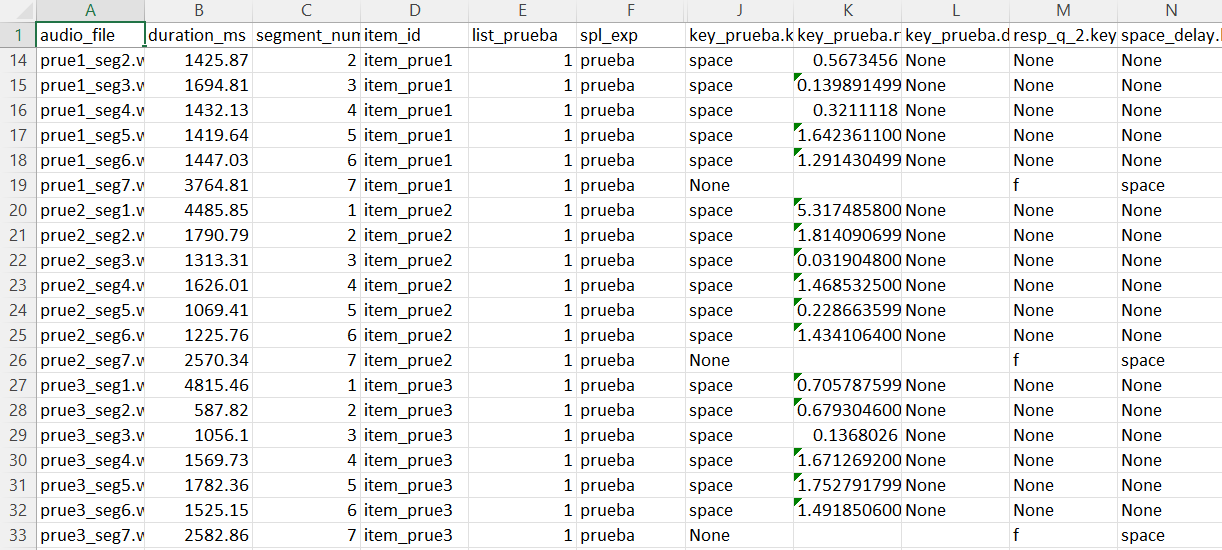
Figure 4. Cropped example of raw PsychoPy output before cleaning.
After:
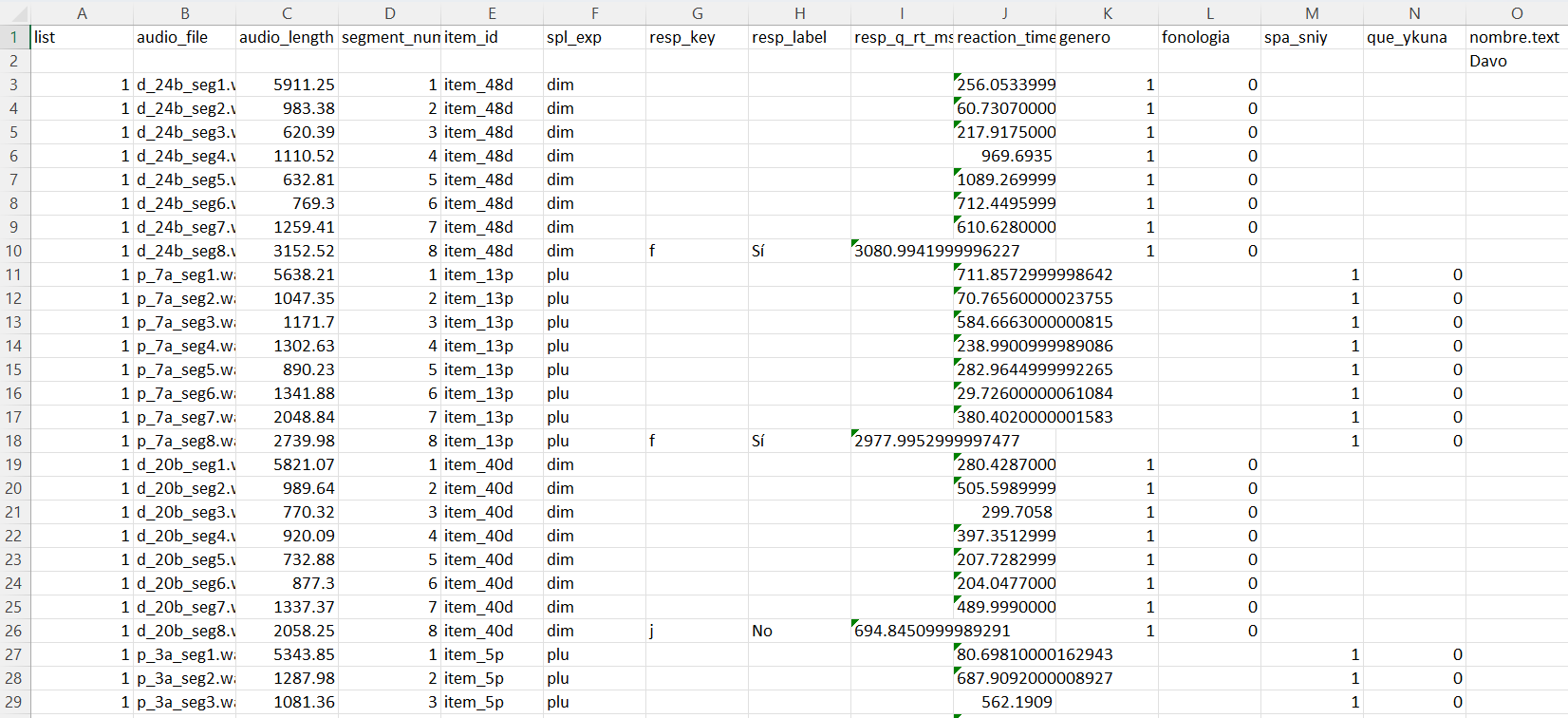
Figure 5. Cropped example of the cleaned dataset after restructuring.
For more detailed information about PsychoPy’s Experiment and Python code visit the following Repository